
EasySurf 50 TM | How To Register & Extend

TM EasySurf 50, also known as EZ 50, is a low-cost TM internet promo for prepaid users in the Philippines. It offers mobile data that you can use for browsing, social apps, and online activities for just ₱50. Easy Surf 50 is valid for a limited time and is ideal for users who require affordable and quick internet access. However, users can extend the promo by registering an extension offer through text, USSD (*143#), or the TM app
TM EasySurf 50 Description
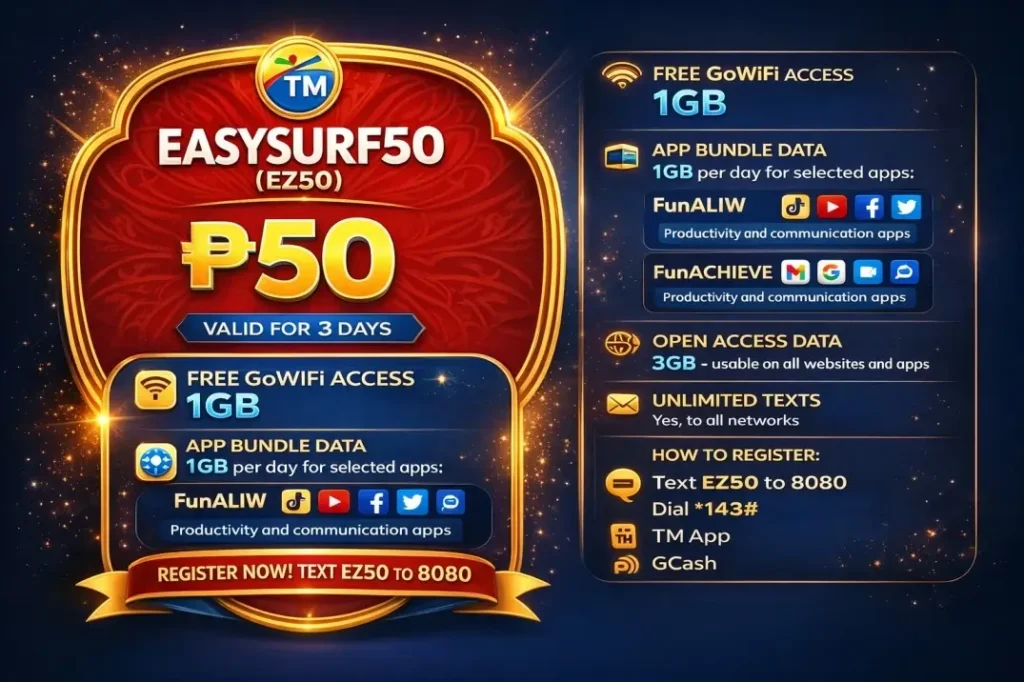
EasySurf 50 TM, also known as EZ 50, is a popular and budget-friendly internet promo for TM prepaid users in the Philippines. For just ₱50, this promo gives mobile data that can be used for browsing, social media, streaming, and other daily online needs. EZ 50 is the best choice for students and regular users who want affordable internet without long commitments.
The promo comes with a short validity period. However, you can extend the promo if the freebies are available. Users can register for EZ 50 through text, USSD (*143#), and online via the GlobeOne app. Overall, EZ50 TM is a simple and cost-effective option in the Globe and TM promos.
Here are more details about it:






|
Feature |
Details |
|---|---|
|
Promo Name |
TM EasySURF50 (EZ50) |
|
Promo Price |
₱50 |
|
Validity |
3 days |
|
Free GoWiFi Access |
1 GB |
|
App Bundle Data |
1 GB per day for selected apps: FunALIW (entertainment apps like TikTok, YouTube, Facebook) and FunACHIEVE (productivity and communication apps like Google apps, Messenger, Zoom) |
|
Registration Keyword |
EZ50 or EASYSURF50 |
|
Open Access Data |
3 GB – usable on all websites and apps |
|
How to Register |
Via text, dial *143#, TM App, or GCash |
|
Unlimited Texts |
Yes, to all networks |
EasySurf App Bundle
TM EasySURF50 comes with an App Bundle that gives you 1GB extra data every day for 3 days. The bonus data works on selected apps like TikTok, YouTube, Messenger, or Zoom. It helps you save your main data while enjoying streaming, gaming, or chatting. This feature is a perfect option for heavy app users or work calls.
|
Bundle |
Focus |
Key Apps |
Best Benefit |
|---|---|---|---|
|
FunALIW |
Entertainment |
TikTok, YouTube, Facebook |
Endless videos/social without worry |
|
FunACHIEVE |
Productivity |
Google apps, Messenger, Zoom |
Smooth work/chats all day |
How to register EasySurf 50 TM?
You can register the EZ 50 promo with four different methods according to your choice. Each method is simple, secure, and free of cost. Below is the step-by-step detailed tutorial about each method.
Register Via USSD (143#)
Here is how to register via USSD code:
- First, dial *143# on your phone with a TM SIM card.
- A menu will appear; select EasySURF from the main menu options.
- Choose the EZ50 from the list.
- Now choose a bundle according to your preference. (e.g., FunALIW for TikTok/YouTube/Facebook or FunACHIEVE for Google/Messenger/Zoom).
- Confirm the registration. You will receive a text SMS on successful promo registration.
Register Via SMS
Follow the steps to register the promo via SMS:
- Open the message app on your phone, type EZ50 or EASYSURF50, and send it to 8080.
- Now select the app bundle:
- For FunALIW, send EZ50 FA to 8080.
- For FunACHIEVE, text EZ50 FC to 8080.
- Once done, you will receive a confirmation message. Now you can use your promo.
Register via the GlobeOne app
The GlobeOne app is the best option to register for the promo online. Before using the app, ensure that you have a stable internet connection. Here is the step-by-step guide to register online via the app:
- Open the GlobeOne app and log in to your account using your login details.
- You will find the promo section on the homepage. Click on that option.
- You will now have various promotional options.
- Select EasySURF50 from the available options.
- Next, select your app bundle and click on Next.
- That’s it, you will get a confirmation SMS. Now you can use your promo.
Register using GCash
You can also register the bundle through official thief party apps like GCash. The GCash app is a secure and easy option to register for the promo online.
Here is how you can register online via the GCash app:
- Download and open the GCash App from Google Play or the App Store.
- Create an account or log in if you’re an existing user.
- Go to the Promos section and select EasySURF50.
- Choose your preferred app bundle and tap Register.
How To Check Promo?
You can easily track the promo usage and check the remaining promo through various methods. Here is how you can track your promo usage:
1: Check Via USSD
Here is how you can check via text message:
- Dial *143# on your TM phone. This will open the TM menu.
- Select TM and then Surf.
- Next, choose “My Surf Status “from the menu.
- Wait a few seconds, and you will receive a message showing your remaining data, the validity period, and the balance of your app bundle.
This service is completely free and does not require an internet connection. In this way, you can check your balance anytime for free.
2: Check Via Text Message
Here is how to check via text message:
- Open the Messages app on your phone.
- Type BAL in a new message. Send it to 8080.
- You will receive an SMS showing your remaining open-access data, the balance of your app bundle, and the validity of your promo.
This method is simple, free, and quick, so you can check your TM EasySURF50 or EZ50 balance anytime.
3: Check Via the GlobeOne
Follow the step-by-step guide to track your promo balance online using the GlobeOne app:
- Open the TM App on your phone.
- Log in using your TM mobile number.
- Go to the Dashboard and then “My Promos section”.
- Here, you can see all your remaining data, the validity of your promos, and any active app bundles.
How To Stop EasySurf 50 TM?
You can inscribe the promo anytime you want. Here are the methods that can be used to stop TM Surf 50:
1: Via Text (SMS)
This is the quickest method. Keep in mind that any remaining data will expire immediately, and the promo won’t automatically renew.
- Open the Messages app on your phone.
- Type STOP EZ50 in a new message.
- Send the message to 8080.
- Wait for the confirmation SMS that your promo has been stopped.
2: Via 143# Menu
Here is how to stop via USSD code:
- Dial *143# on your TM phone to open the TM menu.
- Navigate to TM → Surf → My Surf Status.
- Choose Stop Promo or Unsubscribe. Confirm your choice to stop the promo.
3: Via TM App
This method is convenient if you already use the app to manage your promos and check your balances. However, you need a stable internet connection for this method.
- Open the Globe One App on your phone.
- Go to My Promos or Active Promos.
- Locate EZ50 in your active promos list and tap Unsubscribe.
- Confirm your action to stop the promo.
How To Extend Easy Surf 50?
The TM allows you to extend your TM EasySurf 50 (EZ50) promo for an extra day if it’s about to expire and you still have some data left. Using the EZ EXTEND option, TM lets you keep using your promo without having to register a new one. This way, you can continue surfing, using apps, and staying connected without any interruption.
Here is how you can extend the promo:
- First, check that your TM SIM has at least ₱5 load
- Open the Messages app on your phone.
- Type EZ EXTEND in a new message and send it to 8080.
- Wait for a confirmation SMS from TM. This message will tell you that your (EZ50) promo has been successfully extended for 1 more day.
FAQs
Conclusion
TM EasySurf 50, also called EZ 50, is a budget-friendly and convenient internet promo for TM prepaid users. It provides 3GB open-access data plus extra app bundle data for popular apps like TikTok, YouTube, Messenger, or Zoom for just ₱50. The promo remains valid for 3 days and can be extended for 1 more day using the EZ EXTEND option. Users can easily register, check, or stop the promo via SMS, USSD (*143#), or the TM App.


