
Stop Spam & Scam Texts on TM SIM

Spam or scam texts on TM SIM are disturbing and constantly interrupt our work. Sometimes, they can even be dangerous. Scammers can hack someone’s mobile phone just through a link sent in a text message, allowing them to steal personal photos and account details stored on the device.
Some scammers lure victims with fake discount offers to obtain their account information and then make the money disappear from their account in seconds like magic. As responsible citizens of the Philippines, it is our duty to block these spam and scam messages and help others stay safe from them as well.
This article will guide you through several effective methods to protect yourself from spam and scam messages on your TM SIM and show you how to block them.
How to Block Spam and Scam Text on TM SIM
There are many methods to block unwanted spam or scam messages on your TM SIM. Below are the details of the most effective spam-blocking methods.







Spam Filters
Spam filter is the recommended method by the official Globe Telecom. This is the most powerful and most used method for blocking spam or scam messages on TM. Here are the instructions on how to apply the spam filter for blocking scam messages on TM.
- Open the Play Store and search for Google Messages.
- Download the app using Wi-Fi or mobile internet.
- After downloading, open the app and allow all the permissions.
- Now set the Google SMS app as the default messenger.
- After that, go to the settings and enable the spam protection option.
Now you are protected from all kinds of spam or scam messages.
TM SIM Spam Blocker
Spam Blocker is also an effective method for blocking unwanted texts. Here are the instructions to use it:
- Open the dial pad and dial *123# from your TM SIM card.
- Go to Services, and then choose the Block Spam option from the given choices.
- After this, follow the on-screen instructions and activate the TM SIM Spam Blocker.
After successfully activating the TM scam blocker, you won’t receive scam texts on TM SIM.
Manual Blocking
You can also stop receiving spammy or scammy SMS on your TM SIM card by manually blocking them. Here are the steps:
- Open the number of the sender on your phone.
- Click on the three dots in the upper right corner.
- You will see a Block option there.
- Block the number and click Save changes.
After blocking the spammy number, you can’t receive messages from this blocked contact, but you may still receive this type of message from other numbers.
Report Spam and Scam Messages
Globe Telecom has been working for a long time to provide a spam-free network to its users. After analyzing the situation, they launched different spam-free options on the official website, through which you can report spam messages and texts and help make your TM network spam-free.
How to Report
Follow the steps below for reporting spam:
- First, visit the official TM SIM website.
- Find the Spam section and click on it.
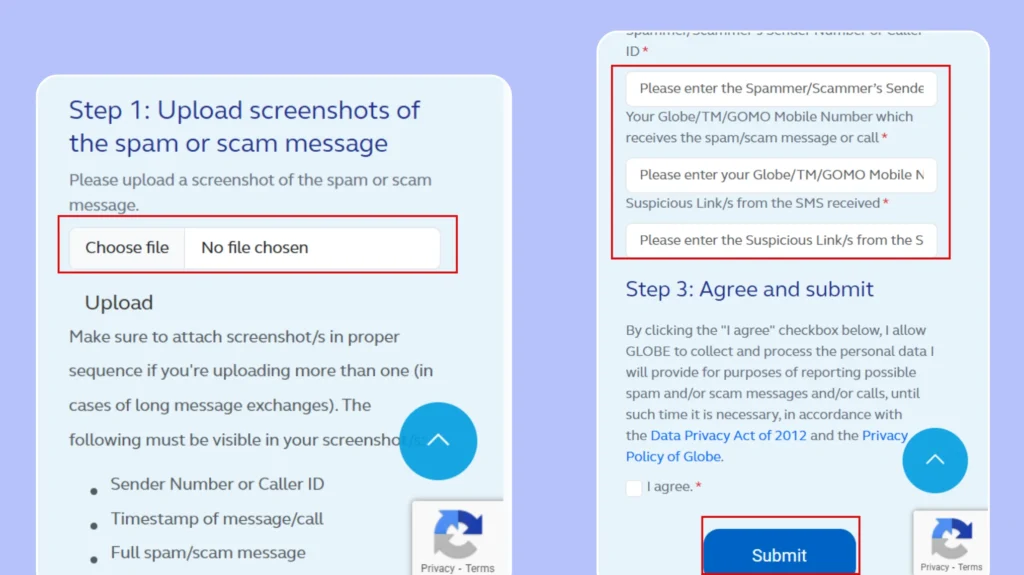
- Upload a screenshot of the spammy messages. You can also upload multiple screenshots at a time.
- After uploading, fill out the required information, which includes:
- Sender number
- Receiver number
- Message text or link
- Read all the terms and conditions and tick the I Agree box.
- Click the Submit button. If there is a captcha, solve it and submit the details.
Your report is now successfully submitted. The officials will review all the details and take action against the scammers.
Why Block and Report Spam Text?
By blocking the spammy numbers, you will be safe and secure from all types of scams. Here are some other benefits of blocking spammy numbers:
- Protect personal information
- Avoid financial loss
- Scam chances are reduced.
- Filter out spam texts
- Reduce network abuse
How To Avoid Scam Texts On TM SIM
As we all know, technology is advancing day by day, and in the same way, the methods of scams are also increasing. These days, many types of scams have appeared in the market that can wipe out our bank accounts within seconds. That’s why it’s important to take action against them.
Here, you are provided with some important points to help you avoid digital scams in the Philippines. Follow them and keep yourself safe from scams.
- Don’t click on any links from unknown numbers.
- Never reply to suspicious messages.
- Don’t share your phone number publicly.
- Don’t sign up for any third-party apps that require your personal information or phone number.
- Enable two-factor authentication on your important accounts.
- Regularly update your phone and apps.
- Be cautious of unexpected calls or messages.
FAQs
Conclusion
Digital scams are very common these days; Scam Texts on TM SIM can lead to various financial or personal issues. Many internet users fall victim to these scams. Therefore, it is necessary to block and report spammy messages.
Use the spam filter or TM Spam Blocker to stay away from scams. Follow all preventive measures to create a safe, secure, and spam-free network. Always stay vigilant and report any suspicious messages to help protect yourself and others.


